

Documentation Index
Fetch the complete documentation index at: https://domoinc-arun-raj-connectors-domo-480814-upadate-new-checkbo.mintlify.app/llms.txt
Use this file to discover all available pages before exploring further.
Intro
This article explains how to connect Domo’s Cloud Integrations to PostgreSQL, allowing you to query and visualize PostgreSQL data directly in Domo without moving or duplicating data.Prerequisites
You must have an account with access to PostgreSQL to move forward.Create or Manage Your PostgreSQL Integrations
To access the integration management interface, follow these steps:- Navigate to Data Warehouse.
- Select Connect Data.
- From the list of Cloud Integrations, choose PostgreSQL.
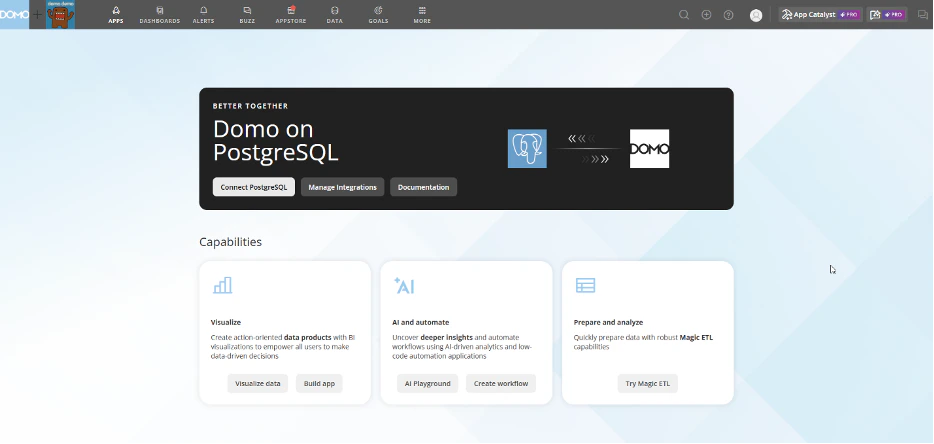
The Domo on PostgreSQL page appears. - Select Connect PostgreSQL to start creating a new integration (see the integration setup instructions).
- Select Manage Integrations to modify existing integrations.
A list of available integrations displays. - Select the wrench icon next to an integration to view available options.
The options shown depend on your access level.
Create a PostgreSQL Integration in Domo
Every PostgreSQL integration in Domo requires an authenticated service account. Once created, a single service account can be reused across multiple integrations. Follow these steps to create a PostgreSQL Integration in Domo.- Provide a name for the integration. This is simply a label to help you identify the integration within Domo. It does not need to match any names in PostgreSQL and can be changed later if needed.
- PostgreSQL instance – Exists independently of Domo.
- PostgreSQL service account – Defined in Domo and connects to the PostgreSQL instance.
- PostgreSQL integration – Uses the service account and adds settings such as connected tables and caching behavior.
Note: Multiple service accounts can connect to the same PostgreSQL instance. Multiple integrations can share a single service account.
- Initially, only the owner of the service account has access.
- The owner can share access with individuals or groups.
- If multiple integrations use the same service account, they inherit the same user privileges.
- Changes to privileges affect all integrations tied to that account.

Create a PostgreSQL Service Account in Domo
Every PostgreSQL integration in Domo relies on an authenticated PostgreSQL service account. Once created, this account can be reused across multiple PostgreSQL integrations. Domo provides a dedicated Accounts Page where you can create and manage service accounts for various external services, including PostgreSQL. After creation, your PostgreSQL service account will appear on this page. Follow these steps to create a PostgreSQL service account in Domo.-
Choose a name to identify this PostgreSQL service account within Domo.
- The name can be changed later
- Use clear, distinctive names to avoid confusion between PostgreSQL accounts and integrations
- You can create multiple service accounts, even if they all point to the same PostgreSQL instance
- Enter the name of your server or its IP address.
- Enter the port that your PostgreSQL instance is using for incoming connections.
- Enter your PostgreSQL Username.
- Enter your PostgreSQL Password.
